Getting Started
Prerequisites
Installation
git clone https://github.com/inas-sirhan/devuxjs.git my-app
cd my-app
pnpm install
Your First Endpoint
Let's build a simple GET /api/books endpoint — no database, no repos. Just a use-case returning hardcoded data so you can see the flow.
Open the CLI
pnpm devux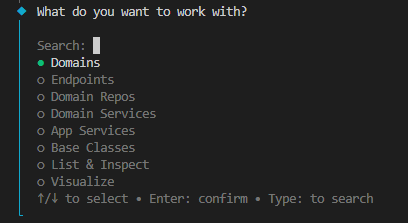
Create the Domain
Domains → Create → name it books
Fill in the Base Schema
The CLI generates packages/shared/src/shared-app/domains/books/zod-schemas/books.base.zod.schema.ts. Open it and define the fields:
import * as z from 'zod';

const shape = {
    // fill in the books fields here
    id:    z.number().int(),
    title: z.string(),
};
Create the Endpoint
Back in the CLI: Endpoints → Create → select domain books
- name it
get-books - method
GET - non-transactional
- no default repo
The CLI generates the full structure — use-case, presenter, validator, route config, DI wiring, and test files.
Request Schema
Open packages/shared/src/shared-app/domains/books/zod-schemas/get-books/get-books.zod.schema.ts. This is where you define the request schema for this endpoint — body, query, and path params. We'll keep it empty for simplicity:
export const getBooksZodSchema = zodStrictPick(booksBaseZodSchema, {
    // pick your request fields here
});

export type GetBooksRequest = z.infer<typeof getBooksZodSchema>;
This schema drives three things automatically:
- Validation — request input is parsed and validated before reaching your use-case
- OpenAPI spec — the request shape is reflected in the generated API docs
- Type-safe client — the frontend API client is generated from this schema
input in the use-case is fully typed as GetBooksRequest.
Route Config
The CLI generates domains/books/endpoints/get-books/get-books.route.config.ts — no need to touch it for this simple endpoint. See Route Config for more details.
export const getBooksRouteConfig = defineRouteConfig({
    method: 'get',
    path: booksPath, // → GET /api/books
});
Define the Response
Open domains/books/endpoints/get-books/get-books.responses.ts. This is where you define all response schemas for this endpoint. For our simple example, we just need a success response:
import { booksBaseZodSchema } from '@packages/shared-app/domains/books/zod-schemas/books.base.zod.schema';
import { zodStrictPick } from '@packages/shared-core/zod/shared.core.zod.utils';

export const getBooksResponses = {
    // fill in your responses here
    'Success': createSuccessApiResponse({
        statusCode: 200,
        dataSchema: createZodObject({
            books: z.array(zodStrictPick(booksBaseZodSchema, { id: true, title: true })),
        }),
    }),
} as const satisfies Responses;
This file is the single source of truth for all possible outputs of this endpoint. It drives:
- Presenter — the use-case calls
this.presenter.present('Success', data), fully typed against this schema - Validation — all outputs are validated against this schema at runtime in development
- OpenAPI spec — response shapes and status codes are reflected automatically
- Type-safe client — the generated frontend client types are inferred from this
- Documentation — one look at this file tells you every possible response this endpoint can return
Fill in the Use-Case
Open domains/books/endpoints/get-books/get-books.use-case.ts:
protected override async _assertCanAccess(): Promise<void> {
    // public endpoint
}

protected override async _execute(input: GetBooksRequest): Promise<void> {
    // fill in your business logic here
    return this.presenter.present('Success', {
        books: [
            { id: 1, title: 'The Pragmatic Programmer' },
            { id: 2, title: 'Clean Code' },
        ],
    });
    // ↑ fully type-safe — the shape of the data is inferred from the response schema.
    // pass a wrong field or wrong type and TypeScript catches it at compile time.
}
Type Safety — Compile Time & Runtime
// ✗ TypeScript error — 'author' doesn't exist in the response schema
return this.presenter.present('Success', {
    books: [{ id: 1, title: 'Clean Code', author: 'Robert Martin' }],
});
What if you bypass TypeScript with as any?
return this.presenter.present('Success', {
    books: [{ id: 1, title: 'Clean Code', author: 'Robert Martin' } as any],
});
// ✗ Still caught — Devux validates all outputs against the Zod schema at runtime (in development).
Environment
Create a .env file under apps/backend/ and add:
HOST=127.0.0.1
PORT=3000
PORT can be any available port.
Run
pnpm -F backend dev
# or
cd apps/backend
pnpm dev
Try It
Open Postman or your browser and hit:
GET http://localhost:3000/api/booksYou should see:
{
    "books": [
        { "id": 1, "title": "The Pragmatic Programmer" },
        { "id": 2, "title": "Clean Code" }
    ]
}
Sync Your API Client
pnpm sync:apiYour new endpoint is immediately available as a React Query (TanStack) hook in packages/shared/src/api/api.react-query.ts:
import { Api } from '@packages/shared/src/api/api.react-query';

// data is fully typed — shape inferred from the response schema
const { data } = Api.useGetBooks();
It also generates apps/backend/api/openapi.json (the OpenAPI spec) and apps/backend/api/api.fetch.ts (a plain fetch client used for E2E tests).
Everything is fully typed — response shape, error codes, and request params are all inferred automatically.
More thorough examples and video tutorials coming soon!